Passwarden vs Roboform Review
In this article, we will do a Roboform review and compare its top features with that of:
Best Alternative to Roboform: Password Managers Comparison Table

Passwarden |

Roboform |
|
| Data encryption | AES-256 and ЕС р-384 | AES 256 |
| Two-factor authentication | ||
| Breach monitoring | ||
| VPN-enabled password manager | ||
| Subscription | $3.99 per month | $1.99 per month |
| Family Plan | 7 accounts | 5 accounts |
| Lifetime Subscription | ||
| Мaster password recovery |
||
| 24/7 Support |
||
| Rating: | 5 | 4 |
A Quick Roboform Review
Two features that make Roboform attractive are: third-party two-factor authentication and automatic form filling. The first feature makes it very easy to sync passwords between Google accounts and Roboform. The second mentioned feature allows you to automatically and accurately fill in web-based forms.
- Password generation. The password generator feature ensures that strong and secure passwords are automatically created for you, this means that you can rest assured that your passwords cannot be easily cracked. Roboform’s software generates 16 character long passwords using numbers, symbols, uppercase, and lowercase letters.
- Ease of use and customization. Roboform can be a little overwhelming when it comes to adding new items. The app has tons of fields to fill out and it doesn’t offer customization options. To cover this, Roboform offers cheaper prices – $1.99 per month. Other plans, such as a free version which allows you to save an unlimited amount of passwords on one device, and a family plan version which allows you to have 5 different accounts all paid through one subscription.
- Auditing. Roboform falls short when it comes to other features such as breach monitoring - so you might want to opt for a slightly more advanced password manager to ensure all-round security. Although Roboform lacks a breach monitoring feature, it does have password auditing. It will review your password and inform whether it is strong or weak.
So overall, from this Roboform review, it is clear that for its low price, this is a decent password manager, however, you should keep in mind that it does fall short on a few important security features.
Ready to safeguard all your passwords?
Download Passwarden on your device today!




Passwarden Review
Now let’s take a look at Passwarden and discuss what makes this password manager one of the best options out there. Passwarden’s extensive security and convenience features make it a great way for you to create, store and manage your passwords.
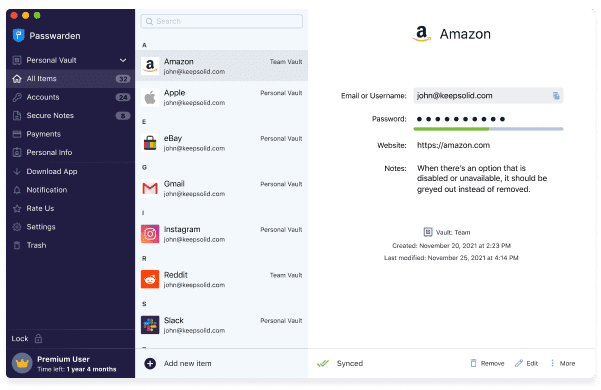
Passwarden is a password manager that grants you great security, encrypts and stores all your sensitive information organized and protected.
Note: Passwarden is a part of the MonoDefense® security bundle.
Secure data encryption
Passwarden makes use of top-level encryption protocols to ensure your passwords and data are well protected against cybercrime. AES-256 and ЕС р-384 protocols are employed, these protocols are top of the range and are the same ones used by military forces worldwide. These protocols scramble your passwords and data, making them unreadable to hackers or anyone else online - it is so secure that even Passwarden employees cannot view your passwords.
Strong password generator
The first step in protecting yourself online is to create strong passwords because weak passwords make you vulnerable to cyberattacks. This can pose a challenge, as some various requirements and criteria make a password strong. With Passwarden, strong and secure passwords are randomly generated for you - giving you rest assurance that you are protected.
Breach monitoring
Data breaches occur when data, including passwords, from millions of users from one particular platform, is leaked to the public. Passwarden’s expertly designed software carefully monitors the web for any such breach and will notify you immediately if your password has been leaked. This feature is extremely advantageous because it alerts of a breach before hackers get the opportunity to log into your accounts.
Additional storage
Passwarden has a unique feature in that it can store more than just passwords. Our software is designed to be a reliable place to store documents such as ID cards, passports, driver’s licenses, social security numbers, and other documents.
What Makes Passwarden Such a Good Option?
Access your password offline
Passwarden’s offline feature allows you to access your account and password even when you are not connected to the internet, providing you with extra convenience.

Strong password generator
Passwarden creates reliable passwords for you - meaning you do not have to go through the trouble of creating these yourself.
VPN available
Get the MonoDefense security bundle, which comes with Passwarden as well as VPN - ensuring you have expert online security.

Use one account across multiple devices
With just one subscription, you can have access to your passwords on an unlimited number of devices.
Are you looking for top-of-range password storage?
Try out Passwarden’s free trial!