
Passwarden vs Remembear Review
Would you be able to tell me which password manager to use that isn't a browser's built-in tool? If the answer is no, don't fret; many individuals wish to safeguard their data but are unable to choose the best password management software owing to the countless options available on the market. As a result, it's preferable to rephrase the preceding query: Would you rather use Passwarden, a more advanced solution, or RememBear, a more straightforward tool?
Best Alternative to Remembear: Password Managers Comparison Table

Passwarden |

Remembear |
|
| Data encryption | AES-256 and ЕС р-384 | AES 256 |
| Password Generator | ||
| Autofill option | ||
| VPN-enabled password manager | ||
| Unlimited Devices | ||
| Family Plan | ||
| Personal plan(per month) | $3.99 | $6.00 |
| Lifetime Subscription | ||
| Money-back guarantee | ||
| Trial |
Full-featured 7-day trial | |
| 24/7 Support |
||
| Rating: | 5 | 2 |
About Remembear: Brief Review
Users may rest confident, as independent security experts who reviewed RememBear have verified that their data is secure with this password management solution from the same company that gave us the convenient VPN TunnelBear. Aside from a trash can for unneeded credentials and an awards page that displays which features have been enabled so far, the vault has several innovative ideas up its sleeve, even if it's confined to merely storing secure notes, credit cards, and passwords.
If you are looking for a simple password manager, RememBear doesn't come as a surprise since it is accessible on all platforms and has add-ons for all the most popular web browsers. However, for iOS users, Face ID and Touch ID authentication options further enhance overall security by serving as a device authenticator and a backup kit, respectively, for automatic password assessment.
Interested in Trying Passwarden?
Download the app now!




Best Remembear Alternative
Passwarden is a password manager that grants you great security, encrypts and stores all your sensitive information organized and protected.
Note: Passwarden is a part of the MonoDefense® security bundle.
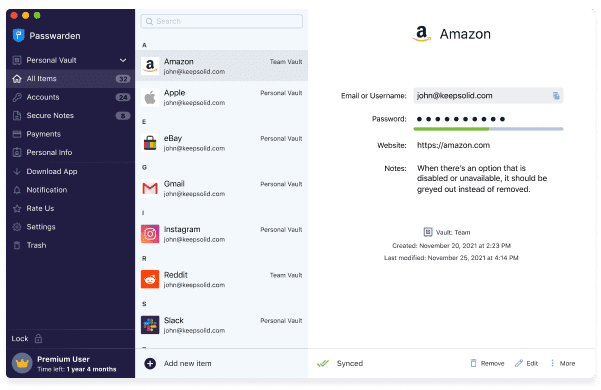
Passwarden is an additional layer of protection for your passwords, payment details, and any other sensitive information. Use the Passwarden add-on to save the data you need in an easy-to-access location and remember just one password—that of your account. KeepSolid's Passwarden has the following features:
- Bulletproof encryption
- Secure data sharing
- Duress mode
- A single account may have as many devices as desired.
- Two-factor authentication
- Password generator
- Password autofill
- Data migration
Benefits of Using Passwarden
Supported platforms
Now accessible on Windows, macOS, Android, iOS, Chrome, Edge, and Firefox. Additionally, you may use our password manager's web interface from any internet-enabled device.
Secure storage
Our storage ensures the protection of all saved data, including passwords, credentials, and other personal information. This is the best safe password manager because of these characteristics. With this app, you may save all of your passwords in a single, extremely secure location.

Secure sharing
Conventional ways of sharing passwords, such as messaging and email, pose significant risks to the security of your data. You can quickly and securely exchange passwords with others. For example, using this method, you may securely transfer Wi-Fi passwords from your iPhone to your Mac and from your iPhone to another iPhone.

Master password
To access your account, you'll need a unique password known as a Master password. This password encrypts all of your private information. Data encryption and decryption operations also rely on this password. However, even the crew team cannot access your Master password or any of the data stored in your vault.
Duress mode
Keeping your passwords secure is crucial, but nothing is more important than your safety. To access our password management software under duress, use Duress mode. Duress passwords may be created for this purpose and utilized when your vault must be opened. Everything else is hidden, and just the data you've specified is seen.

Getting Started
Just three simple steps and you're up and running with our top RememBear alternative! You may safeguard your passwords and other sensitive information with a single master password by following the below procedures:
- Install the app on your device.
- Create a new account or log in using your existing KeepSolid ID.
- Create a master password and confirm it.
You're now ready to establish your Vault and store all your important information away from prying eyes. To make your experience as seamless as possible, check out our thorough guide on how to get started.
Explore safe password management with the ultimate Remembear alternative!