Passwarden vs. iCloud Keychain
If you are searching for an alternative for iCloud Keychain, you have come to the right place. We suggest you a review of Passwarden by KeepSolid and iCloud Keychain managers:
- Security
- Data encryption
- Supported platforms
- Prices
Best Alternative to iCloud Keychain: Password Managers Comparison Table

Passwarden |

iCloud Keychain |
|
| Data encryption | AES-256 and ЕС р-384 | AES 256 |
| Two-factor authentication | ||
| Password Generator | ||
| Offline mode | ||
| Supported Platforms | iOS, macOS, Android, Windows, Chrome, Firefox, Edge, Web | iOS, macOS,Chrome |
| Password Manager with VPN | ||
| Autofill option | ||
| Users in Family Plan | 7 | Does not allow family sharing |
| 24/7 Support | ||
| Rating: | 5 | 3 |
What Is iCloud Keychain Stand For?
iCloud Keychain is a password management system created by Apple. It is built into iPhone, Mac, and iPad. With its help, you will create secured complex passwords. Besides, your credit card numbers, passwords, and account names will be stored on your iPhone, Mac, and iPad keychain and synchronized on all your devices using iCloud. In case of using Safari, you will access your sensitive data.
Passwarden vs iCloud Keychain: Data Encryption
If we compare these two services, they both use the AES-256 encryption standard. This encryption is applied by the US government and military. But, the last one also uses elliptic curve asymmetric cryptography and key wrapping. Nevertheless, iCloud Keychain does not possess multifactor authentication, which makes it an easy target for stealing.
iCloud Keychain is also tied to a user’s Apple ID which makes it less secure. If a third party gains access to the Apple device, they will have a chance to access to all sensitive, personal data stored on the device. So, if you need not only to sync your credit cards and passwords, but identities, logins, banking credentials, and more, you will have to additionally use one of the secure password managers with Duress mode and Master password features.
Passwarden vs iCloud Keychain: Supported Platforms
When we talk about the support of platforms, the last comes straight from Apple. It is integrated into iOS and macOS. But it is not able to function with other platforms. It does not have extensions for numerous web browsers and apps for different popular platforms. This tool is unavailable on Android, Linux, and Windows. But recently, a Chrome extension for this service was released.
Are you ready to test Passwarden?
Our reliable password manager is at your service – set it up and experience secure password management




Important About Passwarden
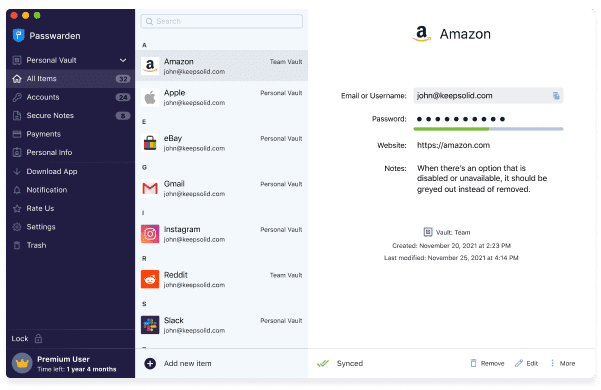
Passwarden is a password manager that grants you great security, encrypts and stores all your sensitive information organized and protected.
Note: Passwarden is a part of the MonoDefense® security bundle.
Data Encryption
Passwarden uses AES-256 security standards and EC p-384 data encryption protocols. It means that all your personal data and passwords will not leak. Besides, it implements client-side encryption. You will not lose your data or disclose your personnel files. Moreover, a Master password provides you with a special security level.
Other Platforms Support
Passwarden is accessible as a browser extension for Firefox, Chrome, and Edge. It is available on mobile iOS and Android, and on desktop Windows and macOS. The web version of our password manager can be used on any internet-capable device.
More About Passwarden Security Features
- Duress mode. It may happen that you will open your Passwarden account under duress. In this case, we will allow you to hide secret details in safe Vaults. In this case, you have to use your Duress password instead of your normal Master password.
- Two-factor authentication. Your account or device will be impossible to access for the third parties. This feature secures your authentication process with an additional layer of safety.
- Strong password generator. Passwarden creates secure and super strong passwords with digits, symbols, and uppercase.
- Cross-device synchronization. It allows you to access your safe Vaults on any device. It shares items and synchronizes the work of all your devices.
Benefits of Using Passwarden
Security dashboard
This is a new Passwarden feature that can help you to defend yourself from security breaches. Test how strong your passwords are. You will know if they are reused.

Password sharing
With the help of Passwarden you can share your passwords with others. It is a safe and secure alternative to sending them via messengers or emails.

The safest password manager
One of the benefits is that it was developed by highly professional cybersecurity experts.

VPN with a password manager
KeepSolid will unite the advantages of VPN and password managers. Get our MonoDefense security bundle and protect all aspects of your cyberlife.

Offline mode
With Passwarden, you can easily access your credentials or passwords even without an active internet connection.

Pricing
Passwarden suggests various variants of subscription such as Personal and Family, for 1 month, 1 year, and for a Lifetime. All of them will offer you the same safety features and security measures.

Get started with Passwarden right now!
Protect your passwords and sensitive data